Free tool for contractors
Every job visit.
documented.
GPS-stamped photo reports that prove what you did, when you did it, and what it looked like — generated and emailed from your phone before you leave the site.
Get Project Log Lite — Free
Sound familiar?
The problems no one talks about until it’s too late
Damage disputes
Client says you cracked the floor. You know it was cracked when you got there. You have no proof.
No progress record
Three weeks in, the client wants to know what’s been done. You’re pulling photos from your camera roll hoping they’re in order.
Liability exposure
Pre-existing conditions, substrate issues, material deliveries — if it’s not documented, it didn’t happen. Until someone says it did.
Scattered photos
Job photos buried in your phone gallery, mixed in with everything else, with no labels, no GPS, and no way to find the right one fast.
What it does
A field log that actually works on the field
GPS + Timestamp on Every Photo
Each photo is automatically stamped with coordinates and the exact date and time it was taken. No manual entry. No editing later.
Unlimited Photos Per Report (Pro)
Document an entire day’s work in a single report. Add as many photos as the job needs. Lite version includes up to 3 photos per report — enough to see what it does, not enough for a full job log.
Labels & Notes Per Photo
Each photo gets its own label and an optional notes field. “Substrate condition before tile” means something. An unlabeled photo means nothing in a dispute.
Professional PDF Report
Single-column photo report with all images, GPS strips, timestamps, labels, and notes. Looks like a real document — because it is one.
Emails Both Parties (Pro)
Hit send. You get a copy. Client gets a copy. Report lands in both inboxes before you pull out of the driveway.
Optional Client Signature
Have the client sign off on the report right on your phone screen. Locks into the PDF. Useful for milestone approvals and pre-existing condition acknowledgments.
Works Offline
No signal on site? Doesn’t matter. Photos are captured and stored locally. Send the report when you’re back in range.
No Login. No Subscription.
Install once. Use it on every job. Free version is genuinely useful — Pro version is genuinely worth it.
The output
This is the actual PDF it generates
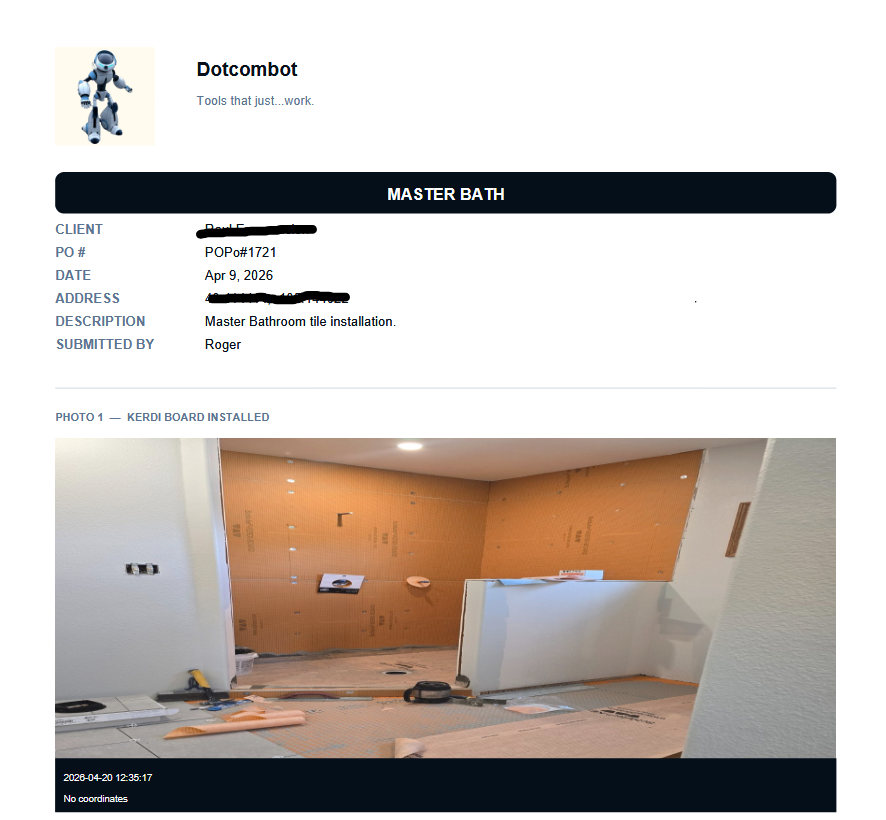
A real report from a real job
This is an actual Project Log Pro report — a master bath tile installation completed April 9, 2026. GPS coordinates, timestamps, photo labels, and notes are all embedded automatically. Click the image to open the full PDF.
Project Log Pro: Your company name, logo, and contact info in the header. Unlimited photos, each with GPS strip and timestamp overlay. Optional client signature at the bottom. Emailed to you and your client the moment you hit send.
Project Log Lite: Same PDF layout and GPS stamping. DCB branding in the footer instead of yours. Up to 3 photos per report. Downloads to your device.
Try it right now
This is the real app. Use it.
The demo below is fully functional. It comes pre-loaded with a sample report — the same Master Bath job from the PDF above — so you can see the full workflow the moment it opens. Click the report to open it, review the GPS-stamped photos, add a photo of your own, or start fresh with + New Report. This is exactly what you’ll have on your phone.
Sandbox mode: data entered here won’t be saved between sessions. In the installed app, every report saves automatically to your device. You can’t break it — go ahead and try the whole workflow.
Free vs Premium
Pick your version
Project Log Lite
Try it on a real job — free
- ✓ GPS + timestamp on every photo
- ✓ Label and notes per photo
- ✓ Professional PDF report
- ✓ Download PDF to device
- ✕ 3-photo cap per report
- ✕ Custom branding
- ✕ Auto email delivery
Get Project Log Lite — Free
Most popular
Project Log Pro
Everything + unlimited photos + your branding
$39
One-time payment. Own it forever.
- ✓ Everything in Lite
- ✓ Unlimited photos per report
- ✓ Your logo & company branding
- ✓ Auto email to you & client
- ✓ Optional client signature
- ✓ Works inside ProjectTracker hub
Buy Pro — $39
Why contractors choose this
No subscriptions. No cloud. No BS.
CompanyCam costs $50/month
Project Log Pro is $39 once. Same GPS-stamped photo reports. No recurring charge, no per-seat pricing, no account to manage.
Your data stays on your device
No photos uploaded to a third-party server. No job data in a cloud database. Everything lives on your phone. You control it.
Built on the job
23 years in the trade. Built because the other apps were too expensive, too complicated, or required an internet connection to do something that should work offline.
Instant ROI
One avoided dispute — one pre-existing condition you can prove — pays for this app many times over. The first time a client can’t argue with your GPS-stamped photos, you’ll understand.
From the field
What contractors are saying
“Client tried to say we damaged the hardwood moving materials. I pulled up the Project Log report from day one — GPS-stamped photo of the existing scratch before we touched anything. End of conversation.”
“I was paying $50 a month for CompanyCam. Switched to Project Log Pro. Same photos, same GPS data, same PDF reports. $39 once. I don’t know why I waited.”
“My clients actually appreciate getting the daily log. It builds trust. They can see the work progressing and they stop calling to ask what’s happening.”
Stop losing the argument you should never have to have.
Get Project Log Lite today. No credit card. No login. Start documenting your jobs with GPS-stamped photo reports before you leave the site.
Get Project Log Lite — Free