DCB Contractor Suite — Hub App
One job. Every tool.
All in one place.
ProjectTracker is the financial and operational hub that ties your entire job together — live profit tracking, change orders, photo logs, completion certificates, punch lists, and a professional job summary PDF. All from your phone. All offline-capable. No subscription.
Get ProjectTracker — $199
The problem with running jobs on your phone
Five apps. Five places to look. Zero connection between them.
Your financials are scattered
Contract amount in a text message. Expenses in a notes app. Change orders on paper. You never actually know where you stand on a job until it’s over.
Change orders don’t make it back to the numbers
You write a change order, the client signs it, and it lives in a folder. Meanwhile your profit calculation is still based on the original contract.
No timeline. No record.
Six months after closeout, someone asks when the punch list was closed or when the client signed off. You’re digging through emails and camera roll photos.
Re-entering the same data everywhere
Client name. Job address. PO number. You type it into every app, every form, every document. Same information, typed five different times.
The workflow
Open a job. Use your tools. Everything updates automatically.
01
Create the job
Client name, PO, project title, contract amount, deposit. One screen. Done.
02
Track costs live
Add expenses, labor, additions, and deductions. Revenue, profit, and margin update in real time.
03
Launch your tools
Tap Change Order Now, Project Log, Snap Close, or PunchList. Job context is pre-filled automatically.
04
Everything reports back
Change orders update your financials. Completions appear in the timeline. All without re-entering a thing.
05
Email the summary
Generate and email a full job summary PDF — financials, timeline, photos, and signature — in one tap.
What’s included
The hub plus four fully integrated field tools
Change Order Now
Formal change orders, on the spot
Auto-numbered change orders with client signature, PDF output, and email delivery. Client name and PO are pre-filled from the hub.
→ Patches change order amount back to job financials automatically
Project Log
GPS-stamped photo documentation
Unlimited photos per report, each stamped with GPS coordinates, timestamp, label, and notes. Generates a single-column photo report PDF and emails it.
→ Reports entry count and date range back to the job timeline
Snap Close
Completion certificates with client sign-off
5-step guided flow: before photo, after photo, client signature, review, send. Generates a professional completion certificate PDF with side-by-side photos and signature.
→ Patches completion status, signed name, and date back to the hub
PunchList
On-site punch list tracking
Add items with before/after photos, priority, and status. Progress bar shows open vs. done at a glance. Close the list when every item is resolved.
→ Patches total items, completed count, and close date back to the hub
Hub features
Everything the central app does on its own
Live Financial Dashboard
Adjusted revenue, total costs, projected profit, and margin — color-coded and recalculated in real time as you enter data. No spreadsheet required.
Full Job Ledger
Four tabs: Expenses, Labor, Additions, Deductions. Labor supports flat-rate or hourly entries with saved role presets.
Automatic Change Order Import
Change orders created in the sub-app appear inline on the job and update the adjusted revenue calculation without any manual entry.
Chronological Timeline
Every job event — creation, change orders, photo log activity, punch list closeout, client sign-off — is logged automatically in order.
Job Summary PDF
Generate and email a multi-page professional summary: contract, change orders, costs, profit, timeline, and activity. One tap.
No Data Re-Entry
Client name, PO, and address are written to a shared bridge when you launch a sub-app. The sub-app reads it and pre-fills every field automatically.
Offline-First
Install once, use everywhere. All five apps work without a signal. PDFs are generated on-device. Emails send when connectivity returns.
Your Branding Throughout
Company logo, business name, phone, and email appear on every PDF output — change orders, photo reports, completion certificates, and job summaries.
The output
A professional job summary, emailed in one tap
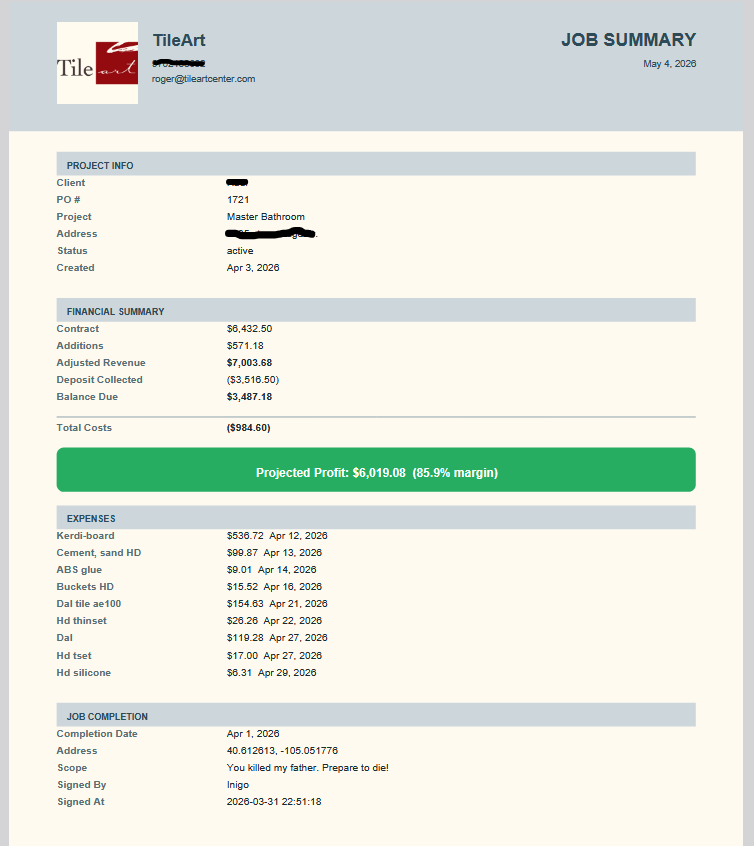
The job summary PDF
When a job is ready to close — or any time you need a record — tap Email PDF. ProjectTracker generates a multi-page summary that includes the full financial breakdown (contract, change orders, additions, deductions, costs, profit, margin), the complete project timeline, photo log entry count, punch list status, and the client’s Snap Close signature.
It emails directly to you. No upload, no server processing, no waiting. The PDF is generated entirely on your device using the data already in the app.
← Click the image to open a real job summary PDF generated by ProjectTracker.
Try it right now
This is the real app. Use it.
The demo below is fully functional. It comes pre-loaded with two real jobs — Henderson Residence (active, $8,400 contract) and Williams Property (complete, $3,200 contract) — so you can see the financial dashboard, the ledger, the change order, the timeline, and the linked tool launcher the moment it opens. Tap a job, edit a number, watch the margin update live. This is exactly what you’ll have on your phone.
Sandbox mode: data entered here won’t be saved between sessions. In the installed app, everything persists on your device. You can’t break it — go ahead and try the whole workflow.
Pricing
One price. Own the whole suite forever.
Complete suite
ProjectTracker + All Four Sub-Apps
Hub + Change Order Now + Project Log + Snap Close + PunchList
$199
One-time payment. No subscription. No per-user fees. Own it forever.
- ✓ ProjectTracker hub — unlimited jobs, live financial dashboard
- ✓ Change Order Now — formal change orders with client signature + PDF
- ✓ Project Log — unlimited GPS-stamped photo reports + PDF
- ✓ Snap Close — completion certificates with before/after photos + signature
- ✓ PunchList — punch list tracking with before/after photo proof
- ✓ Full two-way integration — all apps share job context, all patch back automatically
- ✓ Job summary PDF — emailed in one tap, generated entirely on-device
- ✓ Your branding on every PDF output
- ✓ Offline-capable — works without a signal once installed
- ✓ Installs to your home screen like a native app — no app store
Already own a DCB app? You’ve earned a discount.
If you’ve already purchased any of the apps that are part of the ProjectTracker suite, you get $30 off for each one — up to $120 off the price of ProjectTracker. Enter your license key(s) below and we’ll validate them and generate your discount code. Then paste it into the purchase form.
Ready to buy? Click the button below to open the secure checkout.
If you generated a discount code above, enter it in the Add Promo Code field inside the cart before checking out.
Why contractors choose this
Built for the field. Not the office.
No recurring cost
$199 once. Not $199 a month. Not per user. Not per job. Own it outright and use it on every job for as long as you want.
Your data stays on your device
No photos uploaded to a third-party server. No job financials in a cloud database. Everything lives on your phone. You control it.
No re-entry, ever
Client name, PO, and address flow from the hub to every sub-app automatically. Change orders flow back. Completions flow back. You type things once.
Built by a contractor
23 years in the trade. Built because the other tools were too complicated, too expensive, or required a laptop and a login to do something that should work from a phone on a job site.
From the field
What contractors are saying
“I used to have my contract in one app, my expenses in another, and my change orders on paper. Now it’s all in one place and the profit number updates the second I add a cost. I actually know where I stand on a job while I’m still on it.”
“The change order integration alone is worth it. I write the CO in the field, client signs it, and it’s already in my job financials when I get back to the hub. No manual entry, no forgetting to update the number.”
“I sent a client a job summary PDF at closeout — financials, timeline, the Snap Close certificate, everything. They were genuinely impressed. It looked like something a much bigger company would produce.”
One job. Every tool. All connected.
Stop running your jobs across five disconnected apps. ProjectTracker puts your financials, your field tools, and your job record in one place — and keeps them in sync automatically.
Get ProjectTracker Suite — $199